Google Ads can put a pool builder in front of a homeowner comparing contractors for a new build. It can also spend a serious budget on pool cleaning, public pools, job seekers, and homeowners far outside the build area. The difference is rarely a bidding trick. It is the account structure: how campaigns, ad groups, keywords, and conversions are organized around the work you want to sell.
This is a structure guide for US pool builders, and the same logic applies to deck builders, remodelers, and roofers who sell a considered, high-ticket project. It is the pool-builder version of Google Ads management for contractors, and it pairs with pool builder SEO: one offer per campaign, a clear area, and a landing path you can measure.
If the dashboard stops at clicks and form submissions, you cannot tell whether Google is finding future pool owners or just people with pool questions. A profitable account separates new construction from service work, limits ads to an area crews can cover, and reports which clicks become qualified estimates and sold pools.
How a Google Ads account is actually organized
Google Ads is a four-level hierarchy. Campaigns set the budget, locations, network, and bidding. Inside each campaign, ad groups hold one tightly themed topic, and inside each ad group sit the keywords that trigger your ads and the ads themselves. The important controls live at the campaign level, so anything you want to fund or restrict separately has to be its own campaign.
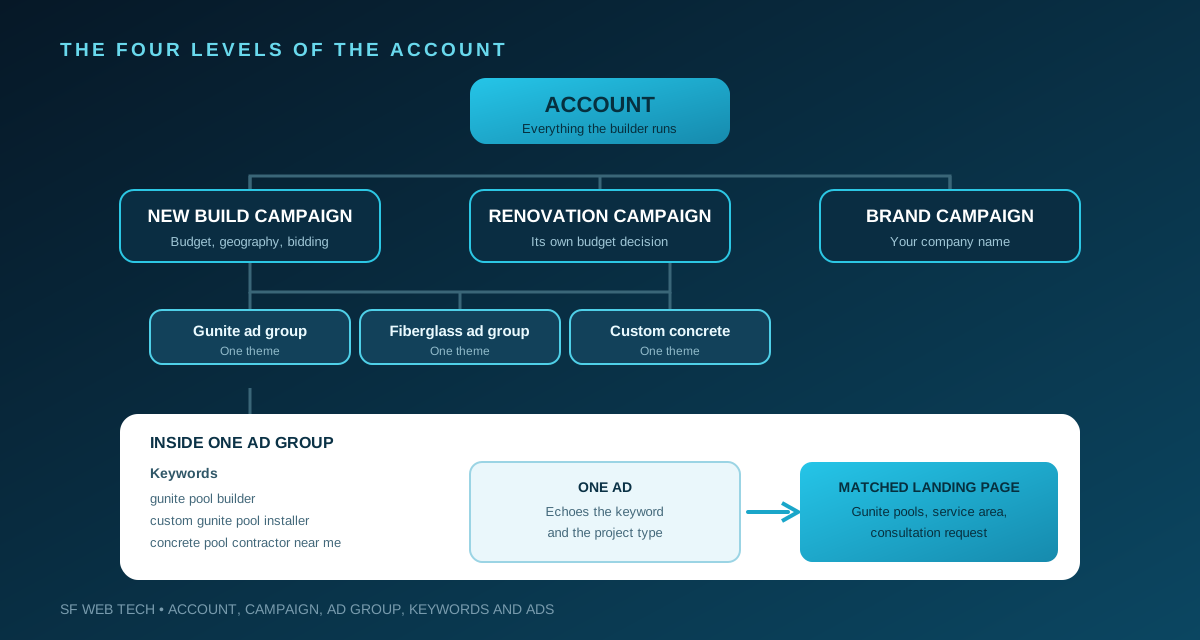
For a pool builder, a new gunite build and a weekly maintenance plan have different values and landing pages, so they belong in different campaigns, each separate enough to fund, pause, or measure on its own.
Why pool builder campaigns attract the wrong traffic
Pool is an unusually broad word. One search can come from a homeowner planning a custom gunite pool, an owner wanting cleaning, a renter after a public pool, or a technician buying a pump. An account that treats them as one audience makes high-value construction traffic compete with low-value service traffic for the same budget, and the cheaper, more frequent searches tend to win.
- custom pool builder
- inground pool contractor
- gunite pool installation
- fiberglass pool installer
- backyard pool design and build
- weekly pool cleaning and maintenance
- pool supplies and replacement parts
- public pool hours and swimming lessons
- above ground and DIY pool kits
- jobs, salaries, training, and certification
Campaign structure, landing pages, call tracking, and reporting built for high-ticket contractors.
See our Google Ads management approachStructure campaigns around the jobs you want
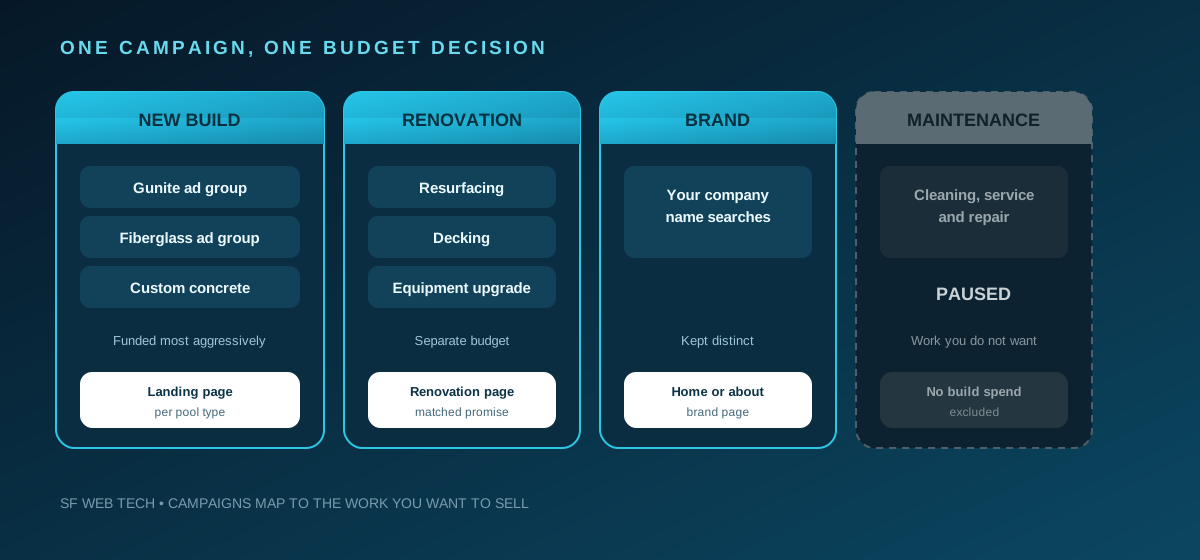
Do not put new pools, remodels, repairs, and maintenance in one campaign. They have different sales values, search language, landing pages, and follow-up. Separate campaigns give each line its own budget and let you pause work you do not want without starving the construction campaign.
- A new pool construction campaign for the build types you sell, such as gunite, fiberglass, or custom concrete.
- A separate remodeling campaign if renovations, resurfacing, or equipment upgrades matter, so they do not consume the new-build budget.
- Repair and recurring service in their own campaigns, or excluded, so a builder does not pay construction-level costs for unwanted work.
- Branded search run separately, since your company name is a different buyer from someone comparing every pool builder in the market.
- Dedicated city campaigns only where you have real projects and crew coverage.
Build tightly themed ad groups
A campaign sets the budget and targeting. The ad group is where relevance is won. Keep each one narrow enough that every keyword in it can be answered by the same ad headline and the same landing page. If two keywords would need different ad copy or a different page, they belong in different ad groups.
- Group keywords that mean nearly the same thing, so a small set shares one ad and one destination.
- Write the ad to echo the ad group theme, then point it at the landing page for that project type.
- Keep groups tight. Loose groups give muddy data and harder decisions.
- Name campaigns and ad groups so the structure reads at a glance in the search terms report.
Choose match types deliberately
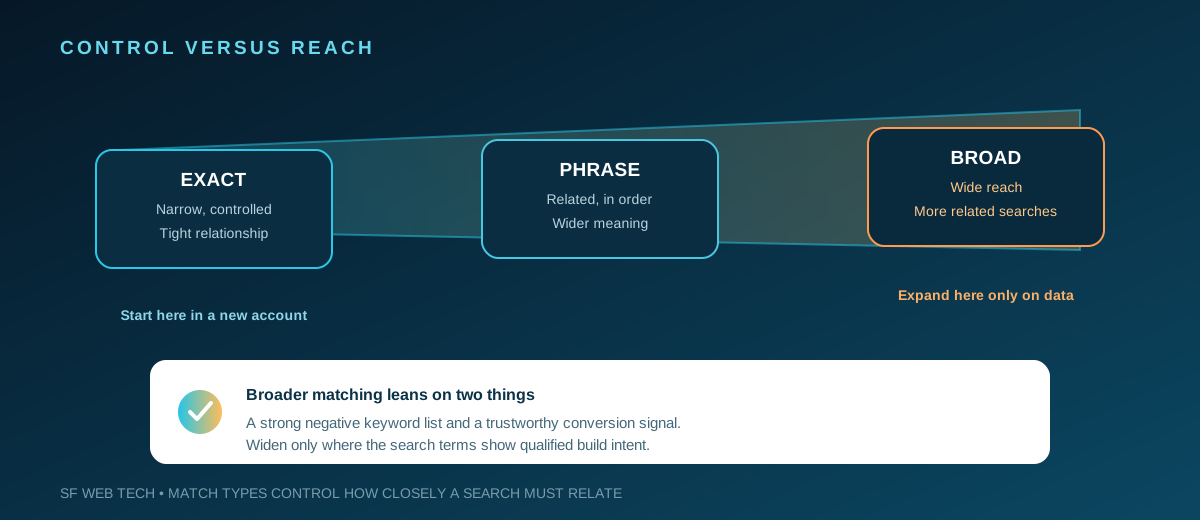
Google's keyword matching documentation explains that match types control how closely a keyword must relate to a search before an ad can enter the auction. Broader matching reaches additional related searches, while exact match narrows the relationship. That reach can help once conversion data is trustworthy, but in a new account with weak negatives it is dangerous. The broader you match, the more the account leans on your negatives to stay on target.
Use negative keywords as budget protection
Negative keywords stop ads from serving for searches that do not fit the offer. Google's documentation notes that negative match types behave differently from positive keywords, so you may need to add synonyms and singular or plural versions you want excluded. A short list copied once is not enough. It has to reflect the search language in your own market, and be maintained.
- Service you do not sell: cleaning, maintenance, opening, closing, chemicals, leak detection, repair.
- Parts and products: pump, filter, heater part, liner, cover, vacuum, robot, lights, supplies.
- DIY research: kit, above ground, how to build, plans, tutorial, do it yourself.
- Employment: jobs, hiring, salary, technician, training, school, license class, certification.
- Public and recreational: public pool, hotel pool, swimming lessons, lap swim, pool hours.
- Wrong geography: cities, counties, and states outside the area where you can profitably build.
Review the search terms report on a fixed schedule, especially after changing match types or budgets. Label each paid query by whether it reflects a potential build, a different service, research, employment, or an irrelevant location. The goal is not to block every unfamiliar phrase, but to stop paying repeatedly for patterns that cannot become the work you want.

Tighten location and radius targeting before raising the budget
A pool builder's true market is not every place a truck could reach. It is the area where the company can survey, design, permit, build, and support a project without travel eroding margin. Draw the footprint from real operational history: where sold projects cluster, where estimates stall, and how far crews can travel. Set the radius from that answer, not from an optimistic map.
Google's advanced location options distinguish between a person's physical location and places they have shown interest in. Review the presence and interest settings instead of accepting the default. Someone outside your build area can consume spend without ever becoming a workable estimate, so choose the setting from your data and sales policy.
How project pages, local visibility, and real proof support qualified pool inquiries.
See the pool builder SEO case studySend each click to a project-specific landing page
The homepage explains the whole company. A paid landing page should help one prospect take one clear next step. A custom pool search should land on a custom pool page, and a renovation search on a renovation page. Matching the ad group, the ad, and the page keeps the promise the ad made.
- Lead with the pool type, genuine service area, and estimate action in the first screen.
- Show completed projects that match the search, with captions about scope, materials, and design.
- Explain the path from consultation through design, approvals, and construction, without a timeline you cannot guarantee.
- Place licensing, insurance, warranties, reviews, and financing near the decision to inquire.
- Use a short form that captures contact, location, project type, timing, and enough scope to route the lead.
- Make calls easy on mobile, but track them so vendors and existing customers are not counted as new leads.
Clear positioning, build types, and service boundaries filter poor fits without making a serious buyer complete a long interrogation. The form should help your sales team start the conversation, not replace it.
Give Local Services Ads and Search different jobs
Local Services Ads and Search Ads are separate products for the same demand. Local Services Ads sit at the top of some results, charge per lead rather than per click, and depend on Google's screening. Search Ads give keyword-level control, custom copy, and a landing page you own. Many pool builders use both: Local Services Ads for high-intent local inquiries, and Search for renovation and research terms where a tailored page convinces.
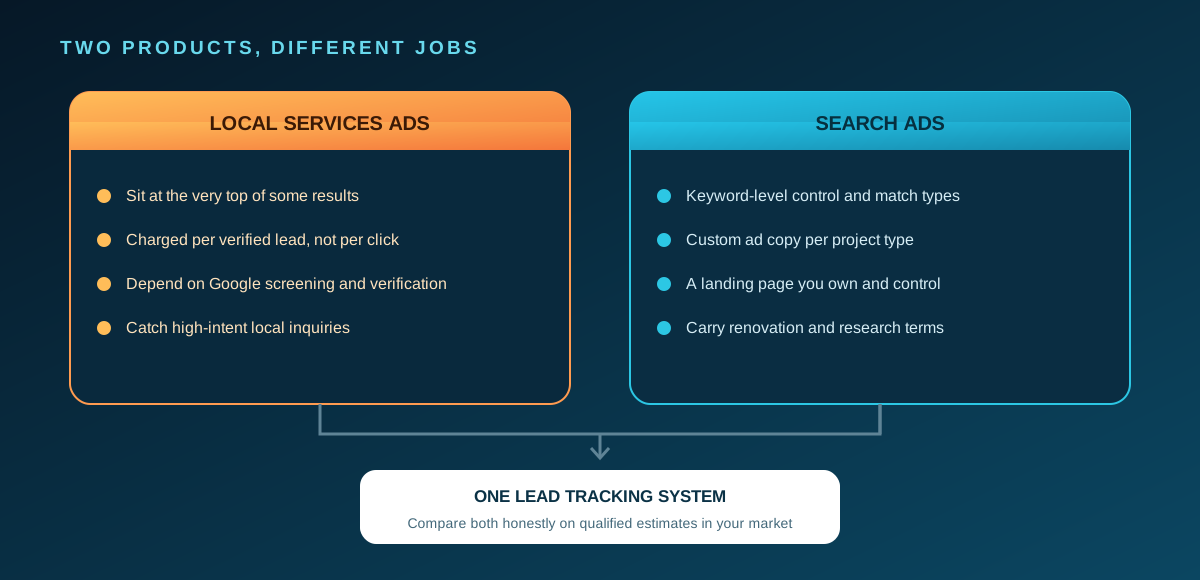
There is no single correct split, because eligibility, screening, competition, and lead quality differ by market. Decide from which channel produces qualified estimates in your area, not from a percentage in someone else's account. Our comparison of Google Ads and Local Services Ads covers how to judge the two with your own numbers.
Pace budget to the season and your capacity
Pool demand moves with the calendar, and so should the account. Many homeowners research a build well before the weather turns, so an account that only wakes up in peak season has lost the planners to a builder who was visible earlier. Rather than a flat budget, lean in when buyers are actively searching, and use ad scheduling to concentrate spend in the hours your team can answer the phone.
There is no universal pool builder ad budget: auction pressure, season, pool type, geography, and close rate all change the answer. Start with what the business can fulfill, because buying more unqualified leads than the team can consult creates slower follow-up, not growth. Work from contribution margin, and keep ad spend separate from fees. Before increasing spend, use the pool-builder marketing readiness checklist to record the offer, service area, capacity, and lead-quality baseline.
Measure qualified estimates and sold pools, not raw leads
Google Ads conversion tracking can record the actions that matter. The first tracked action might be a form or a qualified call, but that is only the start. The useful chain continues through contacted lead, qualified opportunity, design consultation, estimate issued, and sold project. Feeding those later outcomes back, rather than counting only the form, teaches the bidding system which clicks are worth more.
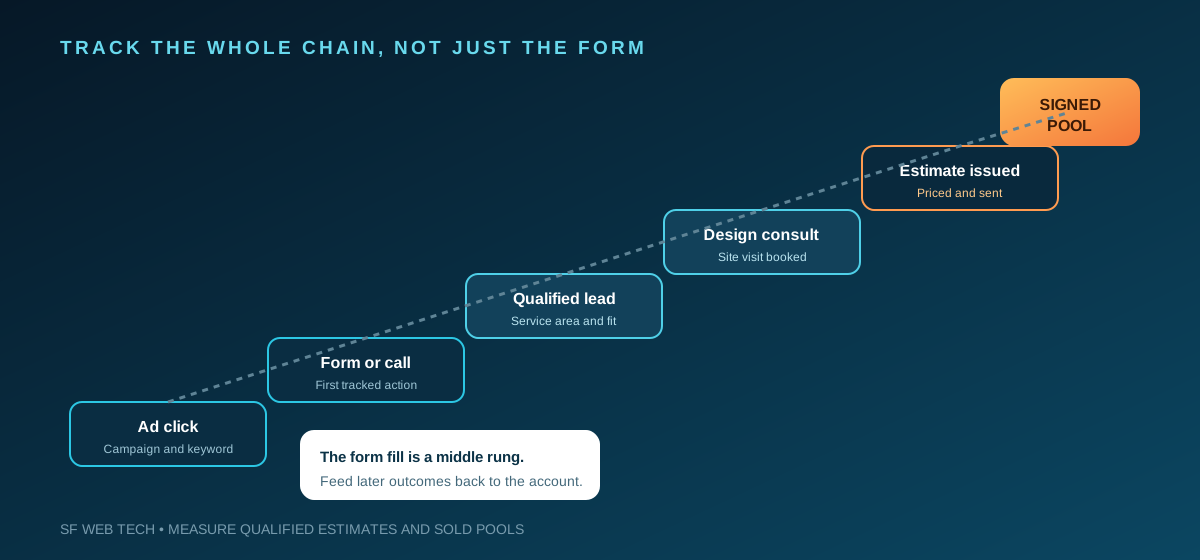
This matters because two campaigns can produce the same number of forms and completely different results. One generates price shoppers; the other generates fewer inquiries but more viable backyards and homeowners ready for a design consultation. If both feed the system as identical conversions, the account learns from the wrong signal and drifts toward the cheaper, worse traffic.
A launch sequence you can follow
- Confirm the pool types, remodel work, and service areas you want to sell this season.
- Build separate campaigns for each economic purpose, with tight ad groups and a matched landing page.
- Launch with controlled matching and a substantial negative keyword list.
- Verify location and radius options, and exclude areas you cannot profitably serve.
- Decide the roles of Local Services Ads and Search, and schedule budget around the season.
- Track forms and calls, then qualify every lead through to estimates and sold pools.
- Review search terms, lead quality, and sold projects together, and move budget toward profitable work.
Use paid search for immediate demand and SEO for compounding visibility, with clear roles for both.
Compare Google Ads with contractor SEOThe bottom line
Google Ads works for pool builders when the account behaves like the business. New construction is protected from low-value traffic, ad groups stay tight and point at matching pages, and geography reflects real crew coverage. Local Services Ads and Search each do their job, budget follows the season, and sales outcomes return to the reporting. That gives an owner a defensible view of which advertising creates qualified estimates and profitable builds.
We will review your account structure, search traffic, landing pages, and lead-quality tracking before recommending a budget.
Book a discovery call with SF Web TechSources and further reading
- Google Ads: how campaigns, ad groups, and keywords are organized
The account, campaign, ad group, and keyword hierarchy and where budget and targeting are set. Pool-specific structure is SF Web Tech guidance.
Source checked .
- Google Ads: keyword matching options
How keyword match types relate to search intent and reach; account strategy and examples are editorial recommendations.
Source checked .
- Google Ads: negative keywords
Negative keyword behavior and match-type differences. The suggested service exclusions require account-specific review.
Source checked .
- Google Ads: advanced location options
Presence and interest settings and the limits of geographic targeting accuracy.
Source checked .
- Google Ads: about average daily budgets
Platform budget and spending mechanics, not a trade-specific CPC or lead-cost forecast.
Source checked .
- Google Local Services Ads: how Local Services Ads work
That Local Services Ads are a separate, screened, pay-per-lead product distinct from Search Ads. Channel split recommendations are editorial.
Source checked .
- Google Ads: set up conversion tracking for your website
Website conversion setup for business-defined actions, supporting the measurement chain. The estimate-to-sold-pool stages are SF Web Tech guidance.
Source checked .