A homeowner in a nice neighborhood pulls up your website at 9 p.m., ready to replace the cracked wood siding on the front of her house. She lands on your gallery page and finds 200 photos in one endless scroll: a soffit repair next to a full stucco job next to a close-up of a nail gun. She cannot tell if you have ever touched fiber cement. Thirty seconds later she is back on Google, tapping your competitor.
A siding buyer may want to see similar work, understand material options and know how an estimate is prepared. Organize genuine projects so those questions are easy to answer. No universal project value or single gallery layout predicts a booking.
Why your gallery page quietly loses the job
Siding visitors may look for projects similar to their home, material, scope, or design constraints. A mixed gallery makes that comparison harder. Filters and captions can reduce the sorting work, but measure how people use them and do not assume every visitor follows the same path.
Test whether visitors can view relevant work, read scope information and make an inquiry on mobile. Use actual project and estimate records for prices rather than an unattributed national range.
Relevant project proof can help a siding prospect evaluate materials, scope, climate, and workmanship. Put permissioned examples where visitors can find them, then compare qualified inquiries and sold work. Do not infer lost contracts or project value from an assumed visitor count.
- Gallery grouped by materials the contractor actually installs
- Approved city or neighborhood context when it is useful and safe to publish
- Clearly labeled before-and-after pairs from comparable viewpoints
- Current warranty and certification information beside the relevant work
- A contextual estimate action at useful decision points
- One long gallery with no material or project filters
- No useful project context
- Unlabeled single images with no before state
- Trust information separated from the work it supports
- Only a generic contact action with no explanation of the next step
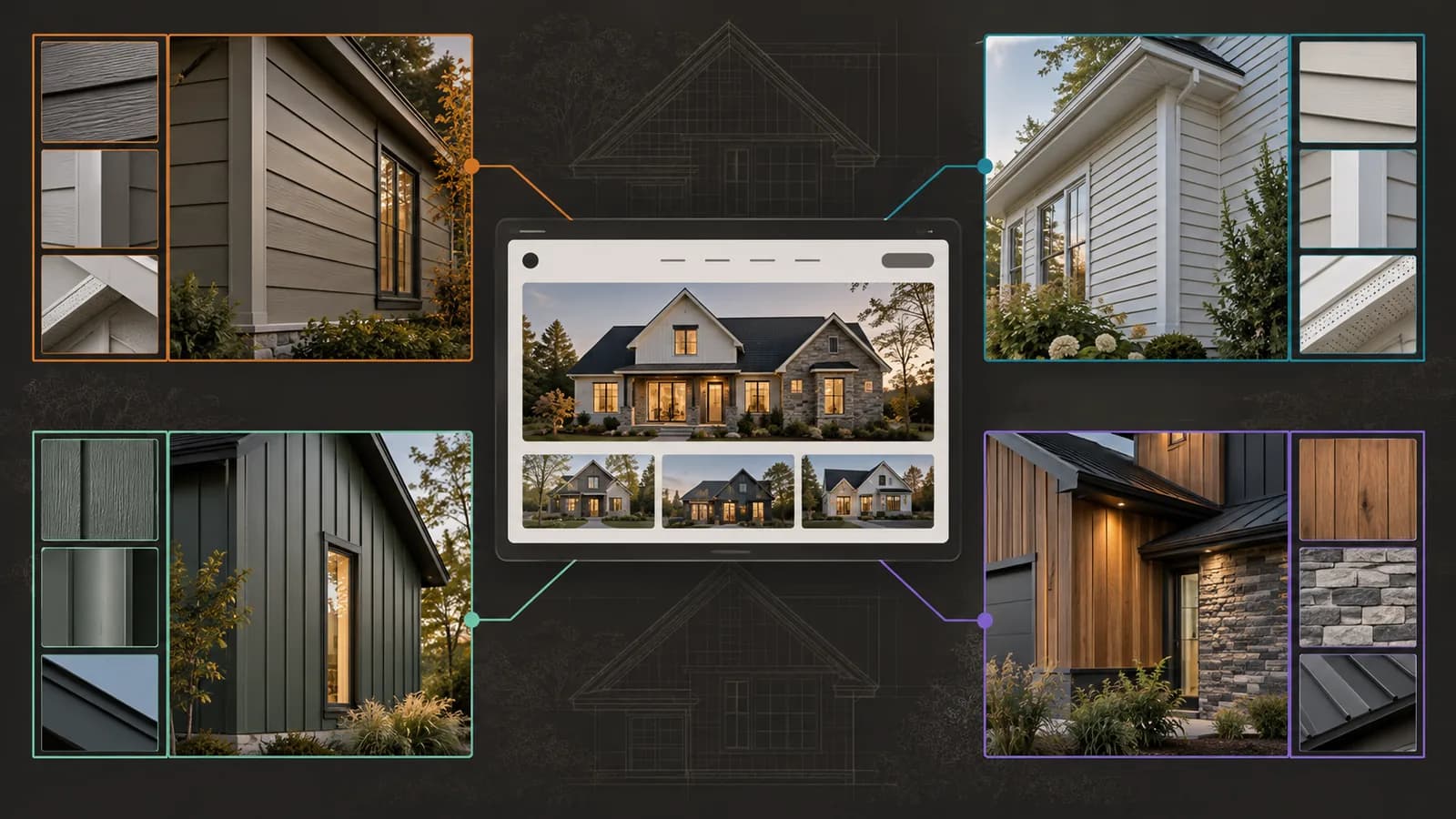
Architect the gallery around materials, not upload date
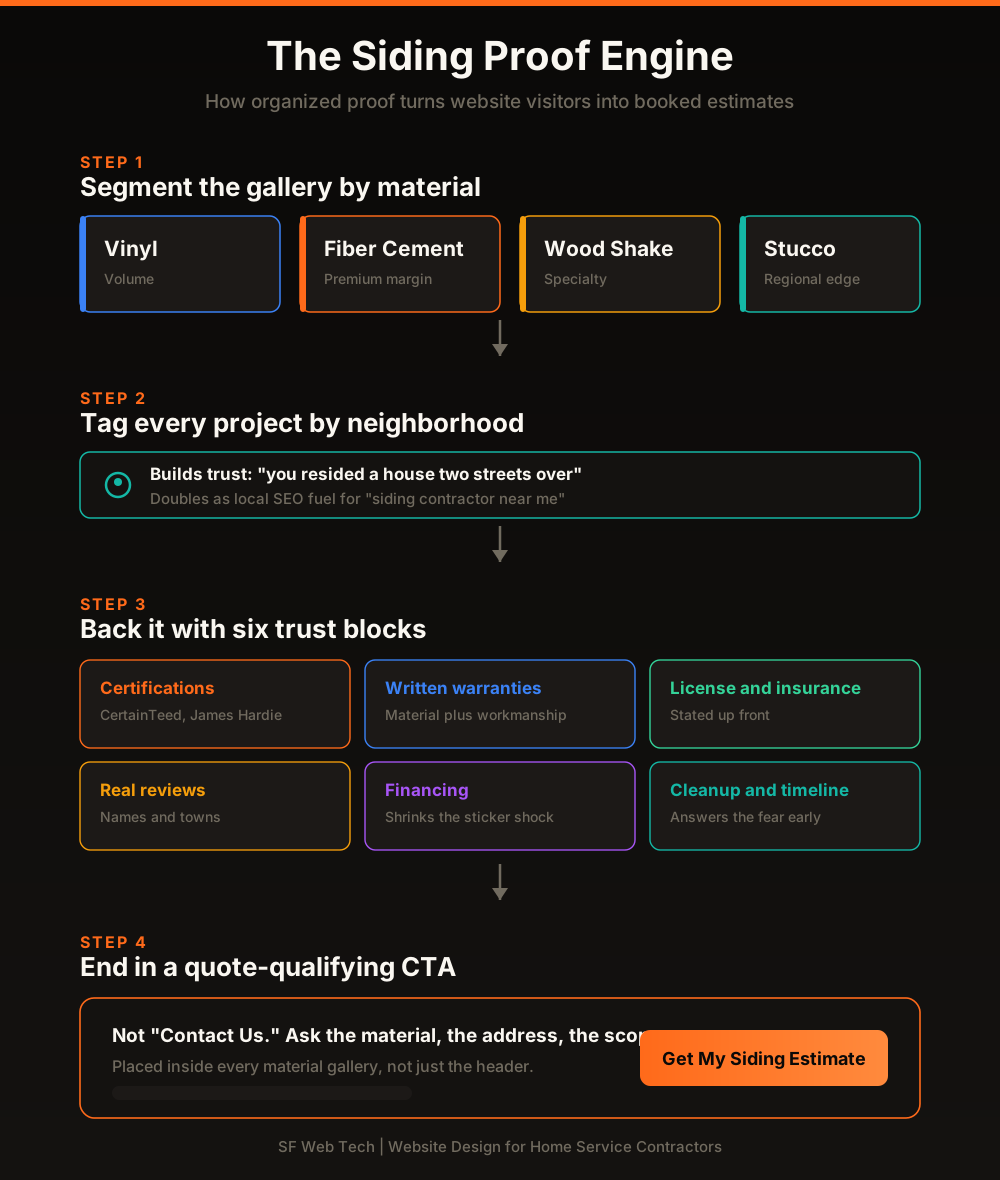
Organize project evidence around the materials and decisions buyers are comparing. Material-specific filters can help a fiber cement shopper find relevant examples without scanning unrelated vinyl work. Use only documented projects with permission, and measure portfolio engagement and suitable estimate requests before deciding whether the new structure helps.
Material is one useful grouping. Location can be another when the homeowner has given permission and the detail is appropriate to publish. Accurate city or neighborhood context may help a visitor recognize relevant experience, but it does not create trust or local visibility by itself.
The five gallery killers to fix this week
Before you rebuild anything, audit what you already have. These are the five mistakes that turn a gallery from a closing tool into a bounce machine, in the order they cost you the most.
- Missing before context. A finished house can still be useful, while a clearly labeled before-and-after pair may make the scope easier to understand.
- Inconsistent viewpoints. Use comparable angles when practical and label dates or phases so the presentation does not imply a false match.
- Missing project context. Add permissioned scope, material, constraint, and general location details that help a buyer assess relevance.
- Heavy, uncompressed images. Resize and encode images for representative mobile devices while preserving useful detail.
- No clear next step. Offer a relevant estimate or contact action near the gallery without repeating it so often that it interrupts the evidence.
Fix those five and you have not touched your marketing budget, your ad spend, or your crew. You have simply stopped leaking the qualified buyers you already earned.
Organize project evidence and inquiry paths around the way customers evaluate the work.
See how we design contractor websitesBefore-and-after photos that actually sell
The before-and-after pair is the single most persuasive asset on a siding website, and most contractors shoot it wrong. The goal is a fair, credible comparison, not a trick. When a homeowner senses staging, trust collapses and takes the estimate with it.
- Capture the same elevation and a comparable viewpoint when practical, and label the project stages accurately
- Show enough of the elevation to make the comparison honest rather than selecting only a flattering crop
- Get written permission and include city or neighborhood detail only at an appropriate, approved level
- Place images side by side or use an accessible comparison control with clear before and after labels
- Caption the actual material, scope, and verified specifications that mattered to the project
“Before-and-after galleries can turn broad claims into inspectable project evidence. Pair each permissioned project with the scope, materials, constraints, an appropriate level of location detail, and an honest outcome. Measure whether visitors use those galleries before requesting an estimate rather than assuming the gallery caused the conversion.”
Trust information that helps a buyer assess the project
Proof gets the buyer interested. Trust gets them to hand over their address and schedule. A siding job is a five-figure, tear-into-my-house decision, so your site has to actively remove risk. Place these six trust blocks near your work, not buried on a separate page.
Show current manufacturer credentials only where authorized, distinguish material and workmanship warranties, and state actual insurance or licensing details. Use genuine reviews with permission. Financing terms must be current and approved; scheduling commitments must match capacity.
Use trust blocks to answer documented customer questions about warranty, crew, process, materials, cleanup, and next steps. Keep each statement specific and verifiable rather than guessing what every visitor fears.
We find the leaks between your traffic and your booked estimates.
Get a contractor SEO and web auditMobile speed: the swipe-back test
Your homeowner is on her phone, at night, comparing three siding contractors in a stack of open tabs. If your gallery stutters or your hero image takes forever to paint, she swipes back to the one that loaded. Speed is not a technical nicety on a photo-heavy siding site. It is the difference between being seen and being skipped.
Resize and compress gallery images, lazy-load content below the fold when appropriate, and audit third-party scripts before the project evidence appears. Compare performance and user behavior before and after the change; a faster gallery can reduce friction but does not guarantee a conversion.
Speed and structure decide both your rank and your close rate.
Why your contractor site is not rankingGive estimate actions useful project context
A generic contact action may not provide enough context for the visitor or the office. A material-specific estimate action can describe the next step and collect only the details needed for routing and preparation. Test wording, placement, completion, accepted leads, and downstream outcomes.
- Request a siding estimate with only the fields needed to assess and route the project
- Ask for project type when it changes qualification or preparation
- Describe the real next step and expected response window
- Place the action near relevant project evidence and test whether visitors use it
- Contact Us without explaining the next step
- Collecting no project detail when the office needs it to route the request
- Hiding the primary action only in the navigation
- Using the same message regardless of the material or evidence the visitor reviewed
A material-specific estimate action placed near the relevant gallery can preserve context and help the office qualify the request. Measure form completion, accepted leads, bookings, won jobs, and paid work before concluding that the placement caused more scheduled estimates.
Review practical opportunities for clearer siding project evidence and inquiry paths.
Book a strategy callYour build sequence
A full redesign may not be required. Prioritize verified mobile, proof, scope, form-delivery, accessibility, and measurement gaps, then test the result. This is a practical sequence, not a claimed universal client process or impact ranking.
Group the gallery by materials the company actually installs, use authorized project photos and place useful scope information near the inquiry path. Check mobile loading and form routing. Link location stories only where real work or coverage details justify them.
These changes can make siding evidence easier to inspect and the inquiry path easier to understand. Treat the website as a measurable sales-support asset: track how visitors use project filters and calls to action, then reconcile accepted leads, estimates, won work, and paid outcomes.
Transparent packages built for home service contractors.
See website design pricingSources and further reading
- Google Search: SEO Starter Guide
Crawlable links, descriptive page information and content organization. Practical trade examples are SF Web Tech recommendations.
Source checked .
- Google Search: creating helpful content
People-first writing, useful original information and the absence of a preferred word count. Does not substantiate a client result.
Source checked .
- Google Maps: prohibited and restricted content
Rules against fake engagement, incentives and selectively soliciting positive reviews.
Source checked .