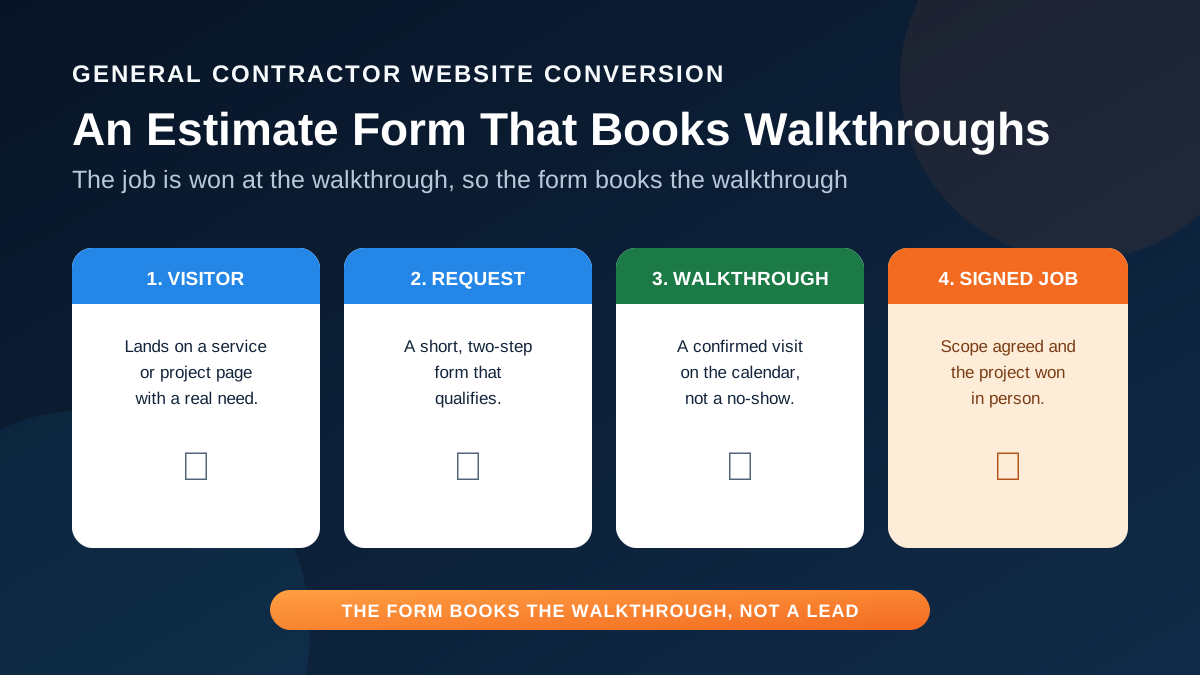
On a general contractor website, the estimate form is usually the most important thing on the page and the least thought through. It sits at the bottom of the contact page, asks for a name and a message, and quietly loses the homeowner who was ready to move. The job is not won in the form. It is won at the walkthrough, the on-site or video consultation where you scope the work and talk price. So the form has one real job: book that walkthrough.
This guide is for general contractors, remodelers, and custom home builders, and it applies just as well to roofers, deck builders, and pool builders. The principles hold across every high-ticket trade: ask only what qualifies and books, split the form so it is easy on a phone, set clear expectations, and follow up fast enough to hold the appointment. Treat the form as a booking tool, and more of your traffic becomes scheduled work.
Decide what the form is actually for
Before you touch the fields, settle the goal. A plumber selling a drain clear can take a lead and dispatch. A general contractor selling a kitchen remodel, an addition, or a custom home cannot. The sale needs a conversation, a look at the space, and a scope. The website is not trying to close the job; it is trying to book the walkthrough where the job gets closed. Hold that line and a lot of form decisions make themselves.
Naming the walkthrough as the conversion changes what you optimize and what you write. You stop celebrating raw form fills and start counting booked consultations and the jobs that follow. Instead of a flat "Contact us," the button and heading can promise the next step: "Request your free walkthrough," or for a builder, "Book a design consultation." The homeowner knows what they are agreeing to, and you know what a win looks like.
Ask only what qualifies and books
Every field you add costs you completions, so each one has to earn its place by qualifying the lead or helping you book and prepare. For a general contractor, a short set does both. Service area tells you whether to book at all. Project type and stage tell you whether this is your kind of work and how close it is. A budget band, offered as a range rather than an exact number, lets a homeowner answer without feeling exposed and lets you match the job to the size you want.
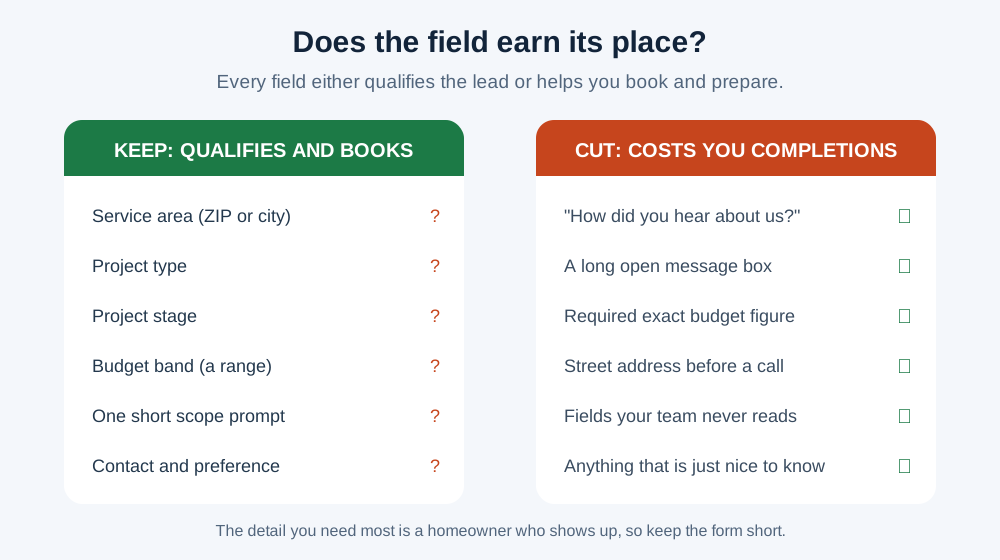
The flip side is the fields to cut or make optional. A long open message box, a required street address before anyone has spoken, a "how did you hear about us" dropdown, and anything your team does not read all tax the completion for no return. Gather the fine detail on the call or at the walkthrough. The detail you need most is a homeowner who shows up. Here is a starting set for a general contractor or remodeler.
- Service area: ZIP code or city, placed early so an out-of-area request is handled up front.
- Project type: a short pick list, for example kitchen, bath, addition, whole-home remodel, new build, or exterior.
- Project stage: just researching, planning this year, or ready to start, so you can sequence follow-up.
- Budget band: ranges, not an exact figure, so a homeowner answers comfortably and you can match the job size.
- Scope note: one short guided prompt, such as "What are you hoping to change?", not a blank essay box.
- Contact and preference: name, phone, email, and how they would like to be reached.
Two steps, not one long form
Even a lean form feels heavy as one tall wall of fields on a phone, and the phone is where most contractor estimate requests begin, often with the homeowner standing in the room they want changed. A two-step form fixes this. Step one asks the quick, low-commitment qualifiers. Step two asks for the scope note and contact details once the homeowner is already moving. Progress is visible, the effort feels smaller, and partial step-one answers still tell your team something.
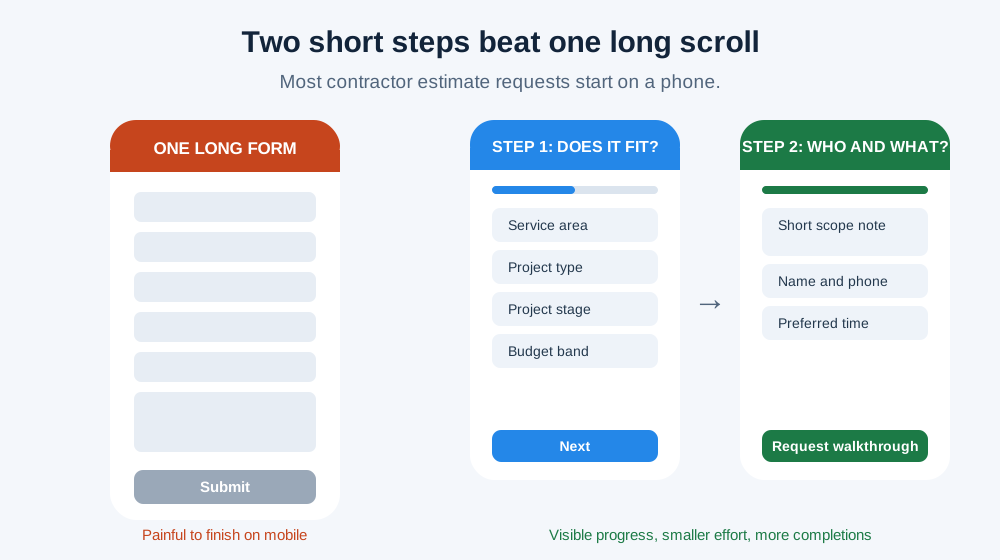
Keep the first step tappable. Pick lists, buttons, and ranges move faster than free text and give you cleaner data to triage. Save the one open prompt and the contact fields for step two. On a conversion-focused build this is standard work, not custom engineering, and it is one of the things we plan on a website design project so the form matches how homeowners behave on a phone.
Set expectations right beside the form
Most of the anxiety a homeowner feels at a contractor form is about what happens after they hit submit. Will anyone call? How soon? Is this a sales trap? You answer all of that with a line or two of plain copy next to the button. State your reply time honestly, name the next step as a walkthrough rather than a sales pitch, and reassure them that the request is not a commitment. A reply time you actually hit beats a bold claim you miss.
Turn the submit into a booked walkthrough
A submitted form is not a booked walkthrough yet, and the gap between them is where most contractors lose jobs. Close it with speed and a simple confirmation habit. The moment a request lands, show an on-screen confirmation and send an email that restates what they asked for and when you will be in touch. If your process allows it, offer a scheduling link right there so a ready homeowner can pick a time without the phone tag. The faster the loop, the more requests become appointments.
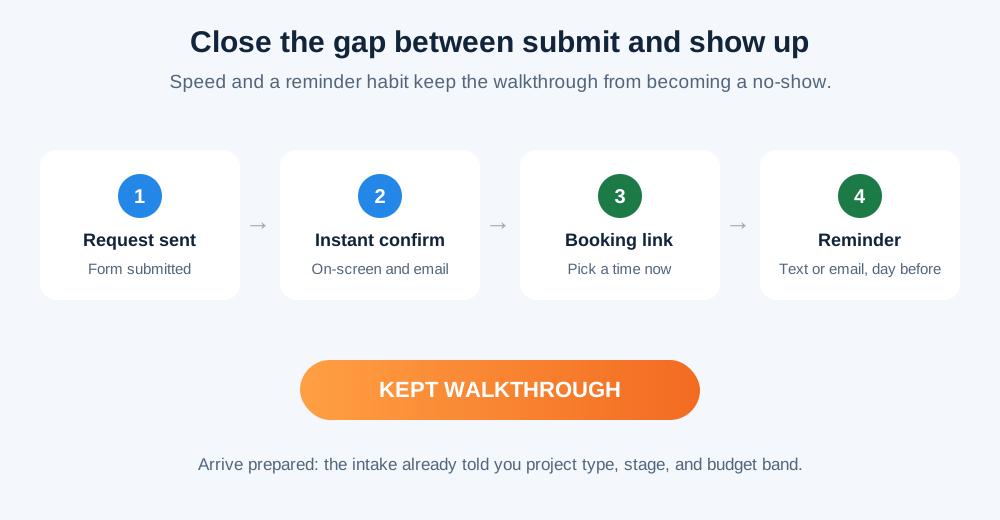
No-shows are the quiet tax on contractor marketing. A walkthrough that evaporates cost you the click you paid for and the slot your estimator held. A short reminder the day before, plus an easy way to reschedule rather than ghost, protects the appointment. Arrive prepared, too: because the intake captured project type, stage, and budget band, your estimator walks in knowing what the conversation is about.
Put the form where the decision happens
A homeowner reading your kitchen remodeling page should not have to hunt for a contact tab to ask for a walkthrough. Put the request where the interest peaks: on every service page, on project and gallery pages near the work that impressed them, and reachable from the header on mobile. Pair it with an obvious click-to-call, because some homeowners would rather talk than type. The form and the phone are two doors into the same booked walkthrough.
- One generic form buried on a contact page.
- A tall single step, painful on a phone.
- Required fields nobody reads, no budget range.
- A silent thank-you page, no reply time or next step.
- A request on every service, project, and gallery page.
- Two short steps with quick taps and visible progress.
- Only qualifying fields, with budget as a range.
- Instant confirmation, a stated reply time, a booking link.
Placement and structure are part of the same job as the pages themselves. If you are still planning those pages, our guide to clear general contractor service pages covers the structure the form sits inside, and the remodeling website guide shows how galleries and scope copy set up the request. A form only converts the traffic that reaches it, so the page does its job first.
Measure booked walkthroughs, not form fills
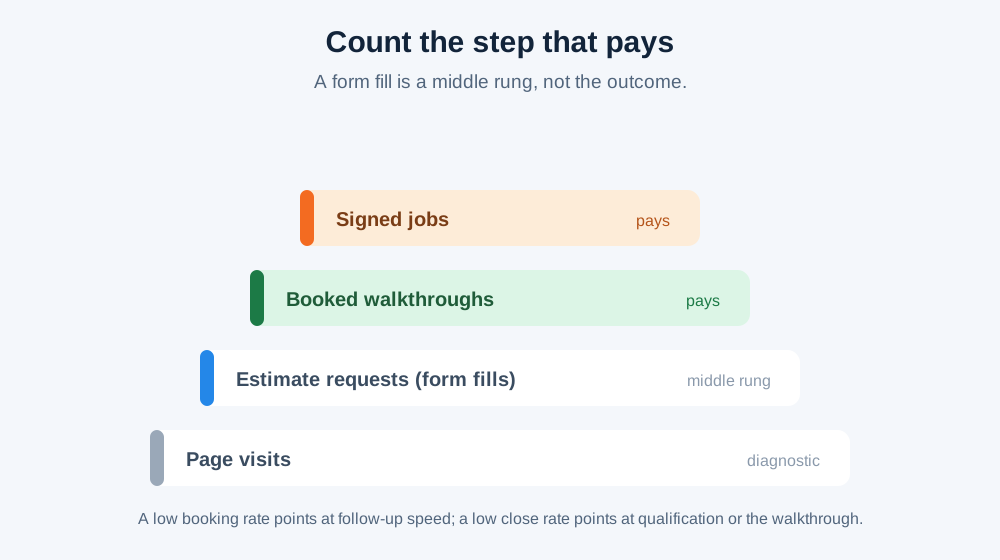
If you only count form submissions, you will optimize for the wrong thing and may even reward a cheaper form that fills more and books less. Count the step that matters, and watch three numbers in sequence:
- Estimate requests: a low rate points at the page or the form itself.
- Booked walkthroughs: a low rate points at follow-up speed and the confirmation flow.
- Signed jobs: a low rate points at qualification or the walkthrough conversation.
Keep that measurement in accounts you own. Your form tool, your analytics, and your Google Business Profile leads should stay readable if a vendor relationship ends, and your Search Console data should stay yours. This is the booked-job discipline we cover in contractor marketing attribution: a number you cannot tie to a kept appointment or a signed contract cannot tell you whether the website pays off.
A field-by-field starting point
Use this as a build checklist for a general contractor or remodeler estimate form. It is a starting point, not a rule. Trim or add based on how your team qualifies and books, and test changes against your own numbers rather than someone else's benchmark.
- Lead with the next step, not "Contact us." Promise a free walkthrough.
- Service area captured early. ZIP or city, up front.
- Project type and stage as pick lists. Fast taps that qualify the lead.
- Budget as a range, never an exact number.
- One short scope prompt, not a blank essay box.
- Two steps on mobile with visible progress.
- A reply-time promise beside the button.
- Instant confirmation and a booking option. On-screen, email, and a scheduling link.
- A reminder before the walkthrough. The day before, to cut no-shows.
- The form on every service and project page. Plus an obvious click-to-call.
Do all of that and the estimate form becomes the most productive square foot of your website. For how it fits the wider plan for a general contractor or custom home builder, and how the website, local visibility, and ads work together, see the full contractor marketing system.
The estimate form, service pages, and booking flow built to turn visitors into walkthroughs.
See how we build conversion websitesTie form fills to booked walkthroughs and signed work with attribution you own.
Track booked jobs, not just leadsBring your current form and we will map the two-step, walkthrough-booking version with you.
Book a free strategy callFAQ
How many fields should a contractor estimate form have?
Should the form ask for a budget?
Is an estimate form better than a phone number?
Next step: open your own estimate form on a phone and time how long it takes to finish. If the honest answer is "too long," book a free strategy call and we will rebuild it around the walkthrough with you.
Sources and further reading
- Google Search: creating helpful, reliable, people-first content
People-first pages that answer the visitor's need, supporting the guidance that the form and page should serve the homeowner's decision rather than chase form fills. Does not substantiate any client result or conversion rate.
Source checked .
- Google Business Profile: guidelines for representing your business
Profile ownership and management roles, supporting the measurement section's point that lead and profile data should stay in accounts the contractor owns.
Source checked .
- Google Search Console
First-party reporting of the queries and pages a site ranks for, supporting the measurement section on keeping source data in the contractor's own account.
Source checked .
- W3C Web Accessibility Initiative: forms tutorial
Accessible, usable form design with clear labels and grouping, supporting the points on short, structured, mobile-friendly fields and visible instructions beside inputs.
Source checked .